
TRACK THE MARKET USING THE ADDON
Our Features
Our tools are initially available on NinjaTrader, including the free version, with more platforms
more platforms to follow. This makes them accessible to traders of all levels. For the the most
futures data, we recommend CQG or Kinetick.
Other data options are available through simulated funding programs, allowing new traders to start without risking personal capital and giving experienced traders extra leverage. Many firms offer one-time or monthly fees as low as $20, though sales aren’t always listed directly on their sites. Free data works with all our tools except Market Depth, and most providers allow upgrading to full depth. Please note, you would need to use the continuum connection for the MarketDepth tools.
We do not endorse any specific firm. Always review each provider’s rules, as requirements vary. Popular options include LucidTrading, Apex, Tradeify, Legends, MyFunderFutures, FundedNext, AlphaFutures, Take Profit Trader, and more.
Anchored VWAP plots a dynamic, volume-weighted average price line anchored from key pivots, automatically creating a new VWAP with each market rotation. This approach keeps the reference point adaptive and closely tied to evolving market structure. A user-defined buffer determines how far price must move beyond the VWAP before the line resets, filtering out minor tests and highlighting only meaningful breaks.

DeltaBars offers a candle coloring mode that visually highlights buying and selling aggression—no need for full footprint bars. This makes it easy to spot dominance shifts directly on the chart. The behavior is fully customizable, allowing traders to set thresholds and visual rules to detect emerging delta trends, potential rotations, absorption and exhaustion points.

DeltaFootprint displays highly customizable delta footprint bars, providing a clear, intrabar view of buying versus selling pressure. With adjustable thresholds, filters, and visual styles, traders can fine-tune the display to spotlight the exact order flow behaviors they want to monitor in real time.

DeltaHeatmap visualizes delta at each price level as a heatmap, transforming raw order flow into an intuitive map of buying and selling pressure. Larger deltas are highlighted as brighter zones, making absorption and aggressive activity stand out. The display can be filtered by delta thresholds, percentage, or maximum count, ensuring only significant areas are emphasized.

DeltaLevels zooms in on aggressive intrabar activity, highlighting real-time order flow as it enters the market and projecting those significant areas forward as reference lines. With extensive customization, Delta Levels automatically map out where aggressive buying or selling first appeared, giving traders clear, session-long markers of key intrabar behavior.

MarketDepth presents a traditional order book view enhanced with advanced features, including a multi-visual pull stack and a delta meter that tracks developing buy/sell pressure on the current bar. Volume-based filtering highlights meaningful size, providing a clear, real-time picture of both market depth and evolving order flow.

PivotDetection automatically identifies swing highs and lows based on rotations in the market. Once a pivot is confirmed, a horizontal line is drawn across the chart, creating a running map of intraday turning points. These dynamic levels serve as valuable references for framing price action against prior swings.

Profiles plots traditional volume and delta profiles for each session, with flexibility beyond standard tools. Profiles can be anchored to custom time ranges, filtered to highlight only significant levels, and styled with full control over width, opacity, and text. Additional options allow for highlighting extremes, such as highest delta levels, offering a detailed view of how order flow shaped each session.

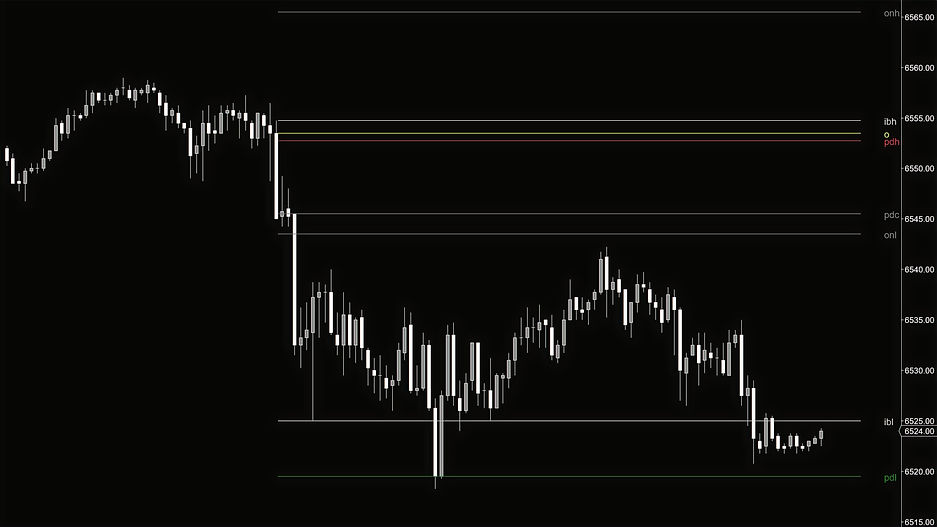
ReferenceLevels automatically plots key price points throughout the session, including initial balance, opening range, overnight sessions, and current or prior day’s highs and lows. Fully customizable, these levels let traders choose which references to display, set session times, and tailor their appearance—providing clear, dynamic markers for support, resistance, and areas of interest without cluttering the chart.
RollingProfile builds a delta profile using a set number of bars, rather than aggregating the entire session. This creates rolling profiles that update with each completed rotation, offering a granular view of order flow development over shorter windows. An optional setting displays the current bar’s developing profile alongside developing ones, giving both historical context and a live view of unfolding activity.

TTIDom compresses what would normally take three or four separate charts into a single panel — multiple timeframe profile and footprint views, enhanced bid/ask columns with full user control, and a custom heatmap that doesn’t just show the orderbook/pull stack but measures the behavior between resting depth and pulled liquidity in real time. Session volume and delta profiles, pullstack tracking, and standard depth-of-market functionality are all built in, but this isn’t a traditional DOM with extras bolted on — it’s an entirely different way to read the auction from one screen.

DOMHeatmap features an orderbook heatmap with granular control over every visual layer. Five independent tiers — each with its own color, min/max opacity, and threshold — let traders define exactly how depth is displayed, while log scaling prevents large resting orders from washing out the smaller shifts that matter. A pullstack overlay tracks where liquidity is being added or removed from the book, and a built-in Delta Tracker plots scaled bubbles wherever significant aggressive activity is detected. Three layers in one overlay: where liquidity is sitting, where it’s moving, and where aggression is hitting.
